
Visual-inertial odometry on a Raspberry Pi Zero 2 W: ROVIO, HybVIO and Basalt compared
Can the smallest Pi run visual-inertial odometry fast enough to help fly a drone? We benchmarked three open-source VIO systems on a Pi Zero 2 W for speed, lag, CPU, memory and accuracy. One of them keeps up at 20 fps on two cores with 18 cm of drift over a 78 m flight.
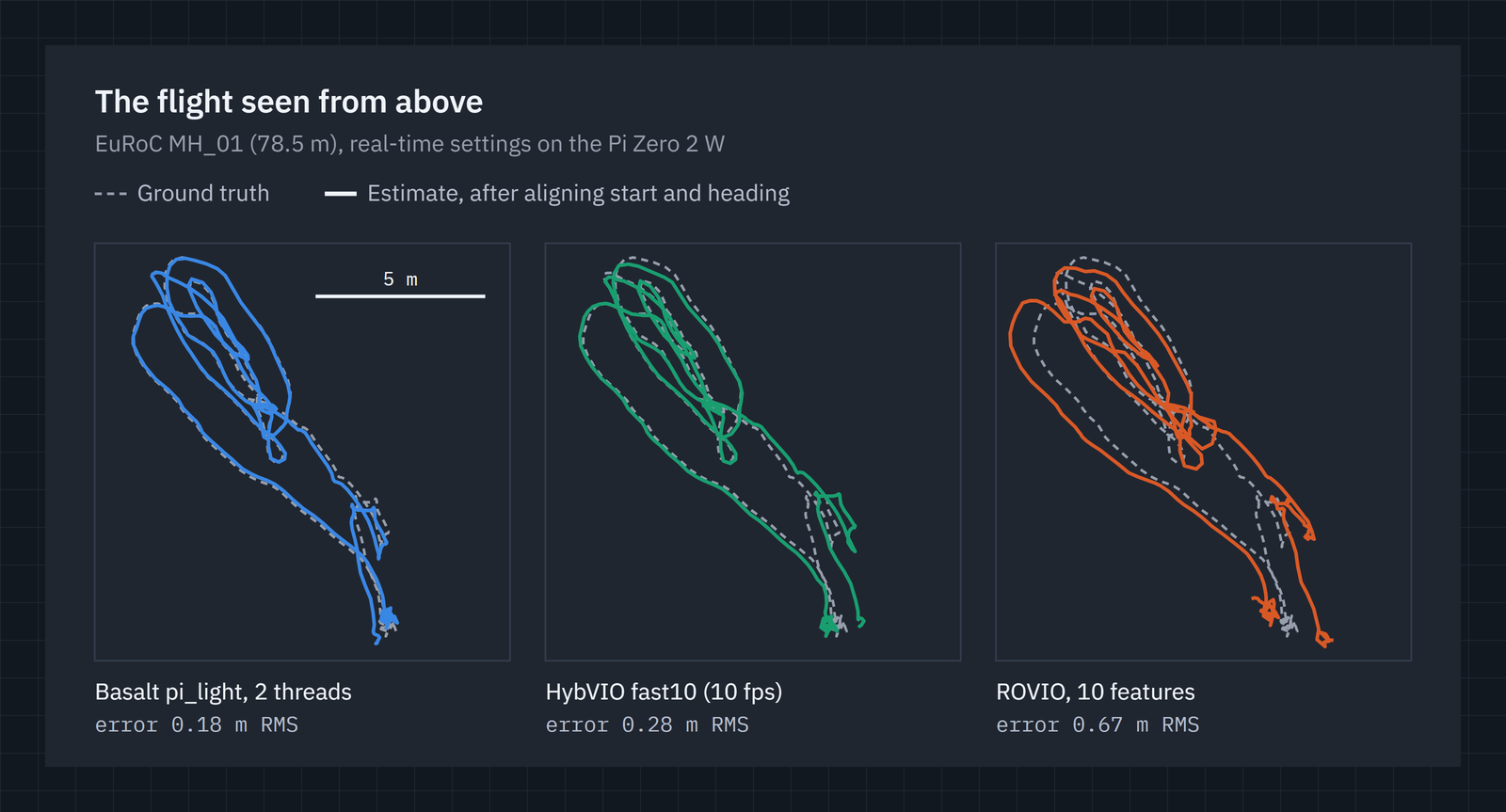
GPS tells a drone where it is outdoors. Indoors, under a bridge or close to a building, it doesn’t, and the flight controller needs another source of position and velocity. Visual-inertial odometry (VIO) is the usual answer. It tracks features in a camera image, fuses them with an inertial measurement unit (IMU), and estimates how the vehicle has moved. PX4 and ArduPilot both accept that estimate over MAVLink.
VIO is normally run on something like a Jetson. We wanted to know whether the smallest host the flightHAT supports, a Raspberry Pi Zero 2 W, can run it well enough to be useful, and how much CPU it would leave for everything else. So we benchmarked three open-source VIO systems on one.
Short answer: yes. Basalt keeps up with a 20 fps camera on two of the Pi’s four cores. Its estimate trails each frame by about 24 ms, it uses 90 MB of memory, and it drifted 0.18 m over a 78.5 m flight.
What VIO has to do
Every frame, a VIO system has to:
- Track features: find points in the image and follow them from frame to frame.
- Integrate the IMU: the gyroscope and accelerometer predict the motion between frames, at hundreds of samples per second.
- Estimate: find the position, velocity and orientation that best explain both the tracked features and the IMU, and update the 3D positions of the features.
The IMU is what makes a single camera enough. On its own, one camera can’t tell a small room from a big one. The accelerometer fixes the scale, and the gyroscope carries the estimate through fast turns and blurry frames.
The three contenders
| System | From | Approach | Threads |
|---|---|---|---|
| ROVIO | ETH Zurich | Extended Kalman filter (EKF). Image patches around each feature go straight into the filter | 1 |
| HybVIO | Spectacular AI / Aalto University | Hybrid filter: an EKF plus a sliding window of recent poses | 1 |
| Basalt | TU Munich | Optical-flow tracking, then optimisation over a sliding window of keyframes | several |
All three are open source and run without ROS. We cross-compiled each one for the Pi’s 64-bit Arm CPU in Docker and wrote a small driver for each that feeds it a dataset and logs what it does.
How we tested
We used the EuRoC MAV dataset, a standard VIO benchmark recorded on a drone with ground truth from a motion-capture system. We used sequence MH_01_easy: 184 s of flight through a machine hall, 78.5 m of path, 752 × 480 greyscale images at 20 fps and IMU data at 200 Hz.
The Pi is a Zero 2 W: four Cortex-A53 cores at 1 GHz and 512 MB of RAM. It was otherwise idle and never throttled (73 °C peak). We ran everything in monocular mode, one camera plus the IMU, because the Zero 2 W has one camera connector. A loader thread decoded the images ahead of time and handed them over like a camera would, so the timings are VIO work only.
We ran each setting two ways:
- As fast as possible, to measure throughput. The real-time factor is the data’s duration divided by the time it took, so above 1 means it keeps up.
- In real time, feeding frames at the recorded 20 fps, to measure the lag: how long after a frame arrives the estimate catches up to it. That’s the delay the flight controller would see.
Accuracy is the absolute trajectory error (ATE), the RMS distance between the estimated and true positions after lining up the start and heading. All the trajectories were computed on the Pi. The real-time runs gave the same errors as the fast ones, so these accuracies hold at full speed.
Accuracy against speed
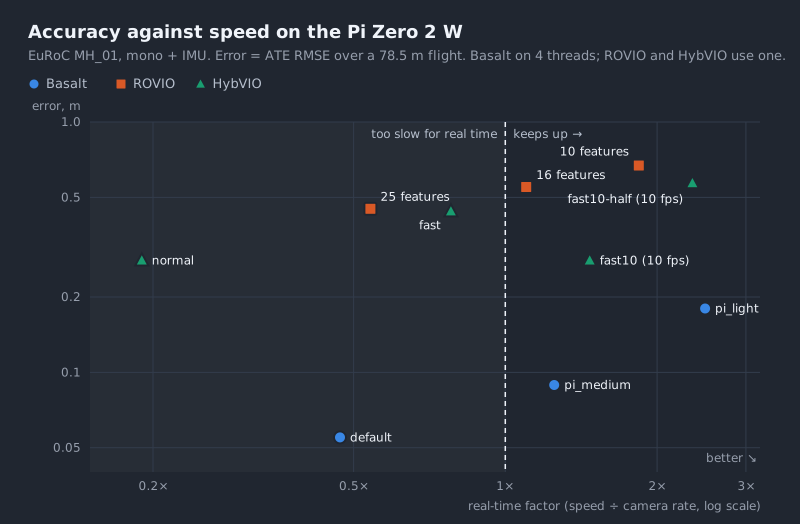
Every system can trade speed for accuracy. What matters is the best accuracy each can reach while staying right of the “real time” line. Basalt’s points are lowest at every speed.
| System, setting | Frame rate | Real-time factor | Threads | Peak RAM | Error (ATE RMS) |
|---|---|---|---|---|---|
| ROVIO, 10 features | 20 fps | 1.84 | 1 | 152 MB | 0.67 m |
| ROVIO, 16 features | 20 fps | 1.10 | 1 | 199 MB | 0.55 m |
| ROVIO, 25 features (default) | 20 fps | 0.54 ✗ | 1 | 278 MB | 0.45 m |
HybVIO fast10-half (376 × 240) |
10 fps | 2.35 | 1 | 30 MB | 0.57 m |
HybVIO fast10 |
10 fps | 1.47 | 1 | 35 MB | 0.28 m |
HybVIO fast |
20 fps | 0.78 ✗ | 1 | 36 MB | 0.44 m |
HybVIO normal |
20 fps | 0.19 ✗ | 1 | 50 MB | 0.28 m |
Basalt pi_light (376 × 240, ~40 features) |
20 fps | 2.49 | 4 | 90 MB | 0.18 m |
Basalt pi_medium (376 × 240, ~90 features) |
20 fps | 1.25 | 4 | 92 MB | 0.089 m |
| Basalt default (752 × 480, ~135 features) | 20 fps | 0.47 ✗ | 4 | 105 MB | 0.055 m |
✗ = can’t keep up in real time on the Pi. pi_light and pi_medium are our reduced Basalt settings for
the Pi. HybVIO’s fast is the setting its authors used on a Raspberry Pi 4. The fast10 variants run at
10 fps and are measured against a 10 fps budget.
Lag in real time
For flying, the delay matters as much as the accuracy: an estimate that arrives late is describing where the drone was.
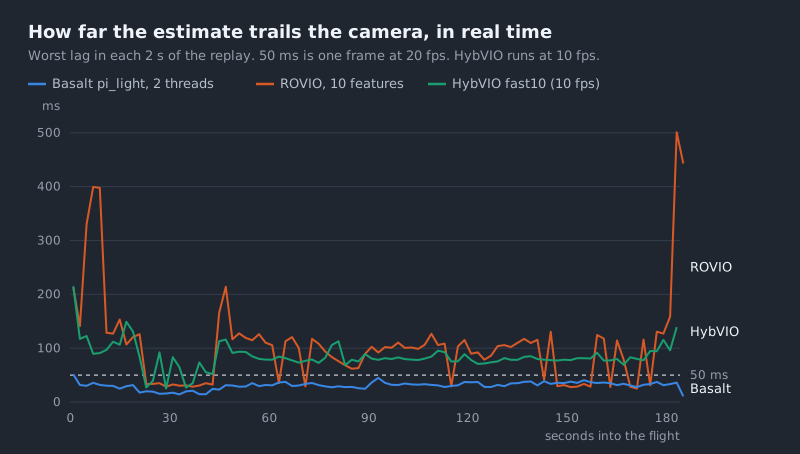
| Real-time setting | Lag median / p90 / max | CPU (all 4 cores) | Peak RAM | Error |
|---|---|---|---|---|
Basalt pi_light, 2 threads, 20 fps |
24 / 31 / 51 ms | 29 % | 86 MB | 0.18 m |
Basalt pi_light, 4 threads, 20 fps |
20 / 27 / 49 ms | 38 % | 90 MB | 0.18 m |
HybVIO fast10, 10 fps |
71 / 85 / 215 ms | 26 % | 35 MB | 0.28 m |
| ROVIO, 10 features, 20 fps | 26 / 83 / 501 ms | 23 % | 152 MB | 0.67 m |
Basalt on just two threads keeps exact pace. Its estimate is never more than about one frame behind, and it leaves two cores for the camera, video encoder and everything else. ROVIO’s median looks as good, but on busy stretches of the flight its single core falls behind and the lag climbs to half a second. HybVIO is steady but runs at half the frame rate, about 70 ms behind.
One thing we found along the way: as shipped, ROVIO holds every estimate back about 100 ms in case a late measurement arrives, and only processes an image once the next one has come in. That’s harmless for recording a map but costly for flight control, so our driver turns both off. The figures above are with that change.
Why Basalt does so much better
Feature cost. ROVIO keeps every tracked feature inside its Kalman filter, about three extra state values each. The filter’s covariance grows with the square of the state, and each update costs roughly its cube. So every feature makes every frame more expensive, and faster than linearly.
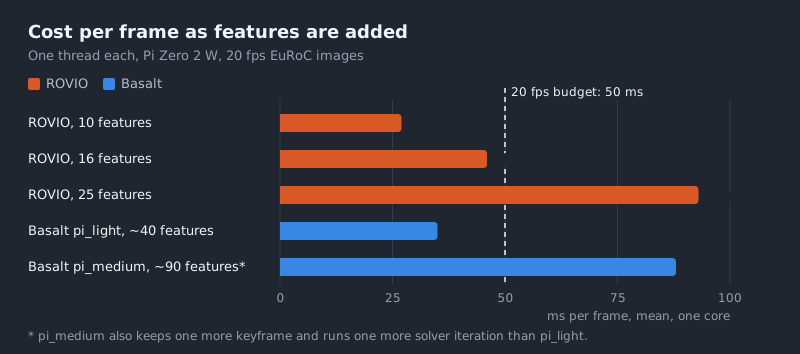
To fit the Pi’s 50 ms frame budget, ROVIO had to drop to 10 features, too few to pin the position down well. Basalt tracks features with a cheap optical-flow step and only puts keyframes and their features into its optimiser. For about the same CPU, it follows around 40.
It revisits its decisions. A Kalman filter linearises each measurement once, at its best guess at that moment, and never goes back. Basalt re-solves a sliding window of recent keyframes and IMU data every frame, so earlier errors get corrected as new views come in. Older keyframes are folded into a compact summary rather than thrown away. HybVIO is a filter at heart too, which is part of why it lands between the other two.
It uses more than one core. Basalt’s tracking and optimisation run in parallel threads. On four slow cores, that’s the difference between keeping up at 20 fps with room to spare and having to drop to 10.
What else we learned
- Mono Basalt works. Upstream only documents stereo, but monocular with the IMU worked out of the box with our driver. Stereo at the same light setting was more accurate (0.10 m against 0.18 m) but slower (real-time factor 1.75 against 2.49), and the Zero 2 W only has one camera connector anyway. Mono is a workable choice, not a big compromise.
- HybVIO is the memory-light option: 30–50 MB against Basalt’s 90 MB and ROVIO’s 150–280 MB. On a 512 MB board that’s worth knowing.
- Check your timestamps. Our first ROVIO results showed 1.3 m of error. The cause was our own driver writing timestamps with only 9 significant digits, about 10-second resolution for Unix time, so poses were compared at the wrong moments. With the timestamps fixed, ROVIO’s error was 0.45–0.67 m. If one system looks suspiciously bad, check the plumbing before blaming the algorithm.
- The Pi is about 26 times slower than a desktop core for ROVIO, but the trajectories were identical on both. The Arm build changes speed, not results.
What this means, and what’s next
On this test, a Pi Zero 2 W can run VIO that’s good enough to matter: under 25 cm of drift over a 78 m flight, delivered within about a frame, using under a third of the CPU. That makes it a candidate for position hold and slow indoor flight without GPS, on a host that costs about $15.
The caveats:
- This was one sequence, an “easy” one with gentle motion and good texture. Faster, more aggressive flight could change the ranking.
- This was a dataset, not a live camera. The images and IMU data came from EuRoC’s calibrated, time-synced rig. On the drone, the camera and the video stream will share the Pi’s ISP and memory.
- VIO drift grows without bound. Over long flights it needs correcting from somewhere else: GPS, markers or loop closure.
Next we’ll run Basalt alongside the live H.264 video stream to see whether both hold their rates on the
same Pi. Then we’ll feed it from the camera’s second, low-resolution output, add a time-synced IMU, and send
the result to the flight controller as a MAVLink ODOMETRY message.
Further reading
- Usenko et al., Visual-Inertial Mapping with Non-Linear Factor Recovery (Basalt), 2019
- Bloesch et al., Iterated extended Kalman filter based visual-inertial odometry using direct photometric feedback (ROVIO), 2017
- Seiskari et al., HybVIO: Pushing the Limits of Real-time Visual-inertial Odometry, 2022
- Burri et al., The EuRoC micro aerial vehicle datasets, 2016
- PX4: Visual inertial odometry
- Our posts on flight controllers and companion computers and on cutting drone video latency on the same Pi